The Best Work-From-Home Setup Under $500 (2026 Guide)
For the first six months of working remotely, I did what I suspect a lot of people do: I worked from my couch. Laptop balanced on a cushion, back curled into a shape that would probably horrify a physical therapist, one earbud in for calls. It felt fine at first — even a little luxurious, honestly. No commute, no dress code, no fluorescent office lighting.
Then my neck started aching. Then my lower back joined in. Then I noticed I was getting distracted every four minutes because the TV was right there, and my “workspace” was also my relaxation space, and my brain apparently couldn’t tell the difference between the two. By month seven, I finally admitted I needed an actual setup — not a fancy one, just a real one.
Here’s what surprised me: I assumed a proper home office would cost a small fortune. It doesn’t. Remote work has become such a permanent fixture of professional life that the market has caught up, and you can now build a genuinely comfortable, productive workspace for under $500. Not a stripped-down, barely-functional setup either — an actually good one.
Whether you’re freelancing, working a remote job, teaching online, creating content, or running your own business from your spare room, the setup you work in has a real, measurable effect on how well you actually work. In this guide, I’m going to walk through exactly what you need, what it costs, and how to put it all together without blowing your budget.
Why Your Setup Actually Matters (It’s Not Just Comfort)
I get it — “invest in your workspace” can sound like something a productivity influencer says right before trying to sell you a $400 desk lamp. But there’s real substance behind it, and it goes beyond simple comfort.
Working from your bed or your couch feels fine in the short term, but it tends to catch up with you. Poor posture creeps in. Distractions multiply because your brain associates that space with relaxing, not working. And productivity quietly drops, even if you don’t notice it happening in real time.
A dedicated workspace fixes several of these problems at once. It gives your brain an actual physical cue that it’s time to switch into “work mode,” which genuinely does improve focus and concentration — there’s something almost Pavlovian about sitting down at a specific desk versus flopping onto a couch. Ergonomic furniture reduces the physical strain that builds up in your neck, back, and wrists over long stretches of typing and sitting. If your job involves video calls, a proper setup makes you look noticeably more professional on camera, which matters more than people like to admit. And practical upgrades — a second monitor, a real keyboard, an organized desk — genuinely help you move through your workday faster and with less friction.
None of this requires an extravagant budget. It requires making a handful of smart, deliberate choices.
The Essential Building Blocks of a $500 Setup
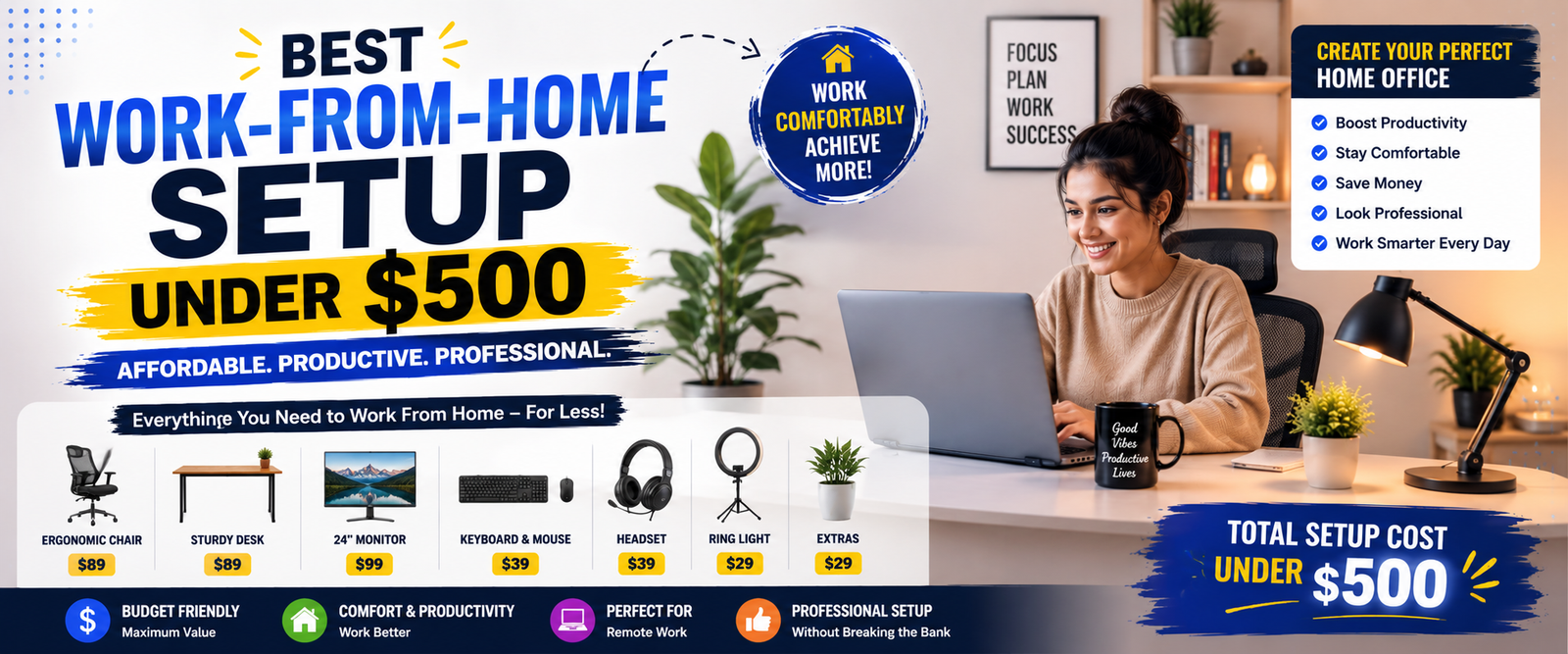
To build a genuinely professional home office without overspending, there are seven core components worth focusing on: a desk or workstation, an ergonomic chair, an external monitor, a keyboard and mouse, a webcam for meetings, a microphone or headset, and finally, lighting and a few small accessories.
Let’s go through each one, what to look for, and roughly what you should expect to spend.
1. The Desk: Your Home Office’s Foundation
Everything else in your setup builds outward from your desk, so it’s worth getting right even on a tight budget. You don’t need anything elaborate — just something dedicated, sturdy, and sized appropriately for your space.
A solid budget option in this category is something like the Callas Engineered Wood Computer Desk with Shelf. Desks in this style tend to work particularly well for smaller home offices because they offer enough surface space for both a laptop and an external monitor, a compact footprint that won’t overwhelm a small room, a built-in shelf for extra storage, and sturdy engineered wood construction that holds up over time.
You’re generally looking at somewhere between $40 and $70 for a desk like this. Don’t let the modest price tag fool you — a budget desk can absolutely provide enough functional workspace for a genuinely productive setup. The desk doesn’t need to be fancy. It just needs to be yours, dedicated, and stable.
2. The Chair: Where Your Money Should Actually Go
If there’s one item on this list worth prioritizing above all the others, it’s your chair. You’re going to spend more hours in it than in almost any other piece of furniture you own, and an uncomfortable chair has a sneaky way of causing real problems — back pain, poor posture, that restless feeling that makes it hard to focus after an hour or two.
A strong option in this price range is something like the CELLBELL Desire Pro Mesh Mid Back Office Chair. Chairs in this category typically offer a breathable mesh back that keeps you from overheating during long sessions, lumbar support to protect your lower back, adjustable height so you can actually dial in the right position for your desk, and enough overall comfort to make extended work sessions bearable rather than something you’re constantly shifting around in.
Expect to spend somewhere between $80 and $120 here. It’s genuinely one of the best investments in this entire list — the difference between a good chair and a bad one shows up in your body by the end of the workday.
3. An External Monitor: The Upgrade You Didn’t Know You Needed
If you’re currently working entirely off a laptop screen, adding an external monitor might be the single biggest productivity upgrade on this entire list. It sounds almost too simple, but a bigger display genuinely changes how efficiently you work.
A solid choice here is something along the lines of the Acer EK240Y G0 23.8″ Full HD Monitor. The benefits of adding a dedicated monitor are pretty immediate: a noticeably larger viewing area, reduced eye strain from not squinting at a cramped laptop screen all day, much better multitasking since you can actually have multiple windows open side by side, and sharper resolution for cleaner, clearer visuals.
Budget around $120 to $150 for a monitor in this category. A 24-inch Full HD display is genuinely well-suited to the kind of work most remote employees actually do day to day — spreadsheets, writing, video meetings, research, all of it.
4. Keyboard and Mouse: Small Upgrade, Big Difference
Laptop keyboards are fine in short bursts, but they get uncomfortable fast once you’re typing for hours at a stretch. Swapping in a dedicated keyboard and mouse is a small, inexpensive change that makes a noticeable difference to both comfort and typing speed.
Something like the Logitech MK200 Media Wired Keyboard and Mouse Combo covers the basics well: a more comfortable typing experience overall, better wrist positioning that reduces strain, a real bump in productivity from more accurate and comfortable typing, and a genuinely affordable price tag to go with it.
This is one of the cheapest items on the whole list — typically somewhere between $20 and $30 — but the impact on daily comfort punches well above that price.
5. A Webcam: Look Good on Camera Without Trying Too Hard
If your work involves regular video calls on Zoom, Google Meet, or Microsoft Teams — and honestly, whose doesn’t these days — a dedicated webcam is worth the modest investment. Built-in laptop cameras tend to be mediocre at best, and how you show up on camera matters more for your professional image than most people realize.
The Logitech Brio 100 Webcam is a solid example of what a good budget option looks like: Full HD 1080p resolution for genuinely sharp video, automatic light correction so you don’t look washed out or shadowy, a built-in microphone as a nice bonus, and simple plug-and-play setup with no fiddly configuration required.
Expect to spend somewhere between $40 and $60 here. It’s a small line item that has an outsized effect on how you come across in every single meeting.
6. A USB Microphone: For When Audio Quality Actually Matters
If your role involves frequent meetings, presentations, or any kind of video or audio recording, upgrading your microphone can make a real difference. Even a great webcam usually comes with a mediocre built-in mic, and audio quality tends to matter more to how “professional” you sound than most people expect.
A basic USB condenser microphone in this price range typically offers clear, crisp voice recording, noticeably improved call quality compared to a laptop’s built-in mic, and some level of background noise reduction to cut down on distractions for whoever’s on the other end of the call.
Budget around $30 to $50 for a decent option here.
7. Headphones: Your Best Defense Against Distraction
Background noise is one of the most underrated productivity killers when you’re working from home — a barking dog, a noisy street, a roommate on their own call in the next room. A solid pair of headphones does double duty: blocking out distractions and improving your audio during meetings.
The Onikuma K2 Pro Wired Gaming Headphone is a good example of an affordable option that covers the basics well — clear audio during calls, decent noise isolation to keep you focused, and comfortable ear cushions that won’t leave your ears sore after a few hours of wear.
Expect to spend somewhere between $20 and $40 here, making it one of the more affordable pieces of the whole setup.
Putting It All Together: A Sample $500 Budget Breakdown
Here’s roughly how all these pieces add up when you put together a complete setup:
| Item | Estimated Cost |
|---|---|
| Desk | $60 |
| Office Chair | $100 |
| Monitor | $140 |
| Keyboard & Mouse | $25 |
| Webcam | $50 |
| Microphone | $40 |
| Headphones | $30 |
| Total | $445 |
That leaves roughly $55 of breathing room in a $500 budget — enough to add a small accessory or two, like better lighting or a laptop stand, without going over. And depending on exactly which products you choose, a full home office build like this can realistically land anywhere between about $372 and $528, which just goes to show that a genuinely professional setup is achievable well within a $500 budget, even with a little flexibility built in.
A Few Extra Accessories Worth Considering
If you’ve got a little room left in your budget after covering the essentials, a few smaller accessories can round out your setup nicely.
A laptop stand elevates your screen to a more natural eye level, which helps your posture and reduces neck strain — especially useful if you’re using your laptop screen alongside (or instead of) an external monitor. A desk lamp improves your lighting for both general work and video calls, cutting down on eye strain and making you look noticeably better on camera. A cable organizer keeps the inevitable tangle of cords behind your desk from turning into a chaotic mess. And a desk mat protects your desk surface while also giving your mouse a smoother, more consistent surface to glide across.
None of these are essential, but if your budget allows, they’re worth adding.
Good Equipment Alone Won’t Save You — Here Are Some Habits That Help
Even the best desk, chair, and monitor setup in the world won’t make you productive if your habits aren’t working in your favor. A few things genuinely help.
Actually use your dedicated workspace. It sounds obvious, but the temptation to work from bed or the couch never fully goes away. Sticking to your desk, even on days you don’t feel like it, keeps that mental line between “work mode” and “relax mode” intact.
Build a real daily routine. Set consistent working hours, and take actual breaks rather than plowing through the whole day without stopping. This does more to prevent burnout than almost anything else on this list.
Lean on productivity tools. Apps like Notion, Trello, Slack, and Google Workspace exist specifically to help you manage tasks and communication without things slipping through the cracks — and most of them have solid free tiers.
Cut down on distractions deliberately. Turn off notifications you don’t need, and put on your headphones if your environment tends to be noisy. Small frictions like a buzzing phone add up over the course of a day far more than people realize.
Mistakes Worth Avoiding When You Build Your Setup
A few common missteps tend to trip people up when they’re putting together a home office on a budget, so it’s worth calling them out directly.
Buying the cheapest chair you can find. This is the one place where cutting corners really does come back to bite you — you’re going to spend hours sitting in it every single day, so comfort deserves to be a genuine priority, not an afterthought.
Ignoring lighting entirely. Poor lighting causes real eye strain over time, and it also makes you look noticeably less professional on video calls — something that’s easy to overlook until you see yourself on camera in a dim, unflattering light.
Skipping the second monitor. It’s tempting to think a laptop screen alone is “good enough,” but a second screen tends to deliver one of the biggest productivity boosts of anything on this list, often for a fairly modest cost.
Letting your cables become chaos. Messy cable management isn’t just an aesthetic issue — it becomes a genuine source of visual clutter and distraction over time, especially in a small space.
Where Remote Work Setups Are Headed Next
Remote work isn’t going anywhere — if anything, it’s becoming even more deeply embedded into how modern companies operate. A few trends worth keeping an eye on if you’re thinking beyond just this initial setup include AI-powered productivity tools that are increasingly built into everyday software, genuinely smart home office devices, more thoughtfully designed ergonomic furniture aimed specifically at remote workers, and the continued rise of hybrid work models that split time between home and office.
As more companies lean into flexible work arrangements, a well-built home office has stopped being a nice extra and has become something closer to essential infrastructure for anyone doing knowledge work.
Final Thoughts
Building a genuinely professional home office doesn’t require a massive budget or a trip to a high-end furniture store. With less than $500, you can put together a setup that includes a sturdy desk, an ergonomic chair, a proper monitor, a comfortable keyboard and mouse, a solid webcam and microphone, and a decent pair of headphones — everything you actually need to work comfortably and look professional doing it.
Investing in the right equipment pays off in ways that go beyond just comfort. It genuinely improves your day-to-day productivity, helps prevent the kind of physical strain that builds up quietly over months of poor posture, and makes the whole experience of working remotely feel less like a compromise and more like something you’ve actually designed on purpose.
Whether you’re freelancing, working a remote job, teaching online, or running your own business from home, a well-thought-out work-from-home setup is one of the most worthwhile investments you can make in how your workdays actually feel — and it’s well within reach, even on a tight budget.